
Hospital Management Software for Small Hospitals: A Practical Buying Guide
CodeCrafts Engineering
Engineering Team
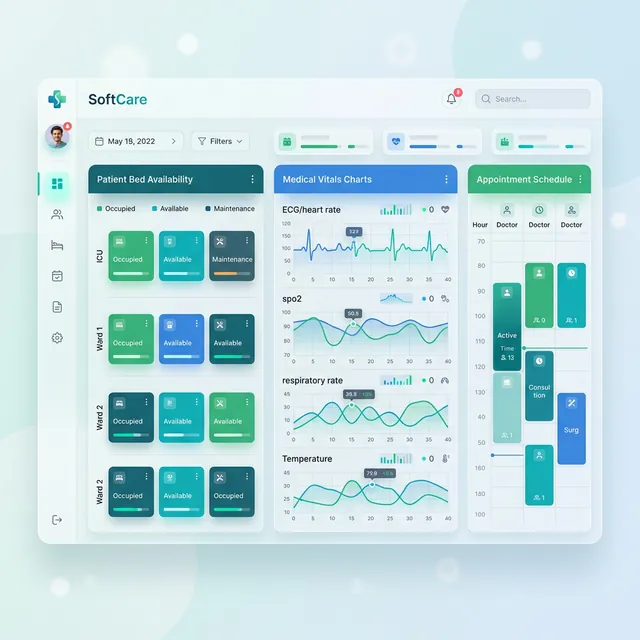
For a small hospital or nursing home, management software can make the difference between a crowded, paper-heavy front desk and a calm, well-organised flow of patients. It can also become an expensive burden if it is chosen in a hurry. This guide is written for owners, medical superintendents and administrators of small and mid-sized hospitals who want a practical, vendor-neutral way to evaluate hospital management software (HMS).
Begin by mapping your patient journey
Every hospital works a little differently. Before you look at any product, walk through the journey of a typical patient: registration, appointment or walk-in token, consultation, investigations, pharmacy, billing and, if admitted, bed allocation, nursing notes, procedures, discharge and final settlement. Note where patients wait, where information is written more than once and where bills are delayed or disputed. These pain points should drive your evaluation.
Core modules for a small hospital
Registration, appointments and queue
A unique patient ID, quick search by phone number, appointment booking and a token or queue display reduce crowding at reception. Check how long it takes to register a new patient during a busy morning.
OPD and IPD flow
In the OPD, doctors should be able to record complaints, diagnoses and prescriptions quickly, and order lab tests that flow directly to the laboratory. For IPD, look for admission, bed and ward management, nursing notes, medication charts, doctor rounds, transfers and a structured discharge summary. The transition from OPD to IPD should carry the patient's record forward without re-entry.
Electronic health records
A good EHR gives clinicians a single view of visits, prescriptions, reports and allergies. Ask how easily doctors can find a previous visit and whether scanned documents can be attached.
Billing and GST
Billing should capture charges automatically from OPD, IPD, pharmacy, lab and procedures, support packages and deposits, and produce GST-compliant invoices where applicable. Healthcare services and medicines can be treated differently for GST, so ask the vendor how tax rules are configured and confirm the setup with your chartered accountant.
Insurance, TPA and PMJAY paperwork
Cashless and reimbursement claims involve pre-authorisation, supporting documents, itemised bills and follow-up. For hospitals empanelled under PM-JAY or with TPAs, ask whether the software tracks claim status, maintains the documents each payer requires and separates patient-payable and payer-payable amounts. Many delays in claim settlement come from incomplete paperwork, so this module can directly affect cash flow.
Pharmacy and inventory
Pharmacy is often where small hospitals lose money unnoticed. Insist on batch-wise stock, expiry tracking with advance alerts, purchase and supplier records, returns and reorder levels. Sales should link to the patient's bill and prescription.
Laboratory and radiology
Look for sample collection and tracking, result entry with reference ranges, doctor approval, and printable or shareable reports. If you have analysers or imaging equipment, ask whether integration is possible and at what cost.
OT, emergency, HR and reports
Depending on your services, you may also need OT scheduling, emergency registration that does not slow down treatment, staff rosters and MIS reports on revenue, occupancy and department performance.
Patient-data confidentiality and the DPDP Act
Medical records are among the most sensitive personal data a business can hold. India's Digital Personal Data Protection Act, 2023 sets out general obligations for organisations handling digital personal data, including purpose limitation, reasonable security safeguards and responding to data breaches. Without offering legal advice, it is sensible to ask vendors:
- Is access controlled by role, so that billing staff cannot see clinical notes unnecessarily?
- Is there an audit trail showing who viewed or changed a record and when?
- Where is data hosted, is it encrypted, and how often is it backed up?
- How quickly can data be restored after a hardware failure?
- Can the hospital export its complete data if it changes vendors?
Consult your legal adviser on your specific compliance obligations, and make sure your contract clearly states that the hospital owns its data.
ABDM and ABHA: ask, do not assume
The Ayushman Bharat Digital Mission (ABDM) and ABHA health IDs are shaping how health records may be shared across providers in India. If digital health interoperability matters to you, ask each vendor directly about their current ABDM integration status, which milestones they support, and their roadmap. Ask for evidence rather than relying on marketing claims.
Connectivity considerations in J&K
A hospital cannot stop registering patients because the internet is down. In parts of Jammu & Kashmir, connectivity can be affected by terrain, weather and occasional service disruptions. Ask whether the software can run on a local server inside the hospital, whether a cloud system has an offline mode, and how data syncs when the connection returns. Also plan for power backup for servers and networking equipment.
Understanding cost
Pricing models vary, and you should compare total cost over several years rather than the first invoice. Common approaches include:
- Per-bed pricing, linked to the hospital's capacity.
- Per-user or per-login pricing, based on the number of staff using the system.
- Subscription (SaaS), a recurring fee usually covering hosting, updates and support.
- One-time licence with an annual maintenance contract.
Other cost factors include the number of modules, customisation of bill and report formats, data migration, hardware (servers, printers, barcode scanners, token displays), equipment integration, SMS charges, training and ongoing support. Ask for an itemised written quotation.
Questions to ask vendors
- Can you demonstrate a full OPD-to-IPD-to-discharge cycle using our own scenarios?
- How does pharmacy handle batches, expiry and returns?
- How do you support insurance, TPA and PM-JAY claim documentation?
- What is your current ABDM integration status, and can you show it?
- What happens when the internet goes down?
- Who provides training and support, from where, and during what hours?
- Can we speak with hospitals of a similar size using your software?
Implementation steps
- Appoint a project lead and representatives from reception, nursing, pharmacy, lab and accounts.
- Prepare master data: doctors, services, tariffs, wards, beds, drug lists and suppliers.
- Configure and test billing, packages and GST settings with real examples.
- Train by department, with short, role-specific sessions.
- Go live in phases, often starting with registration, OPD and billing before IPD and pharmacy.
- Run a short parallel period and review reports with management before retiring paper.
Training and local support
Hospitals work around the clock, and problems rarely wait for office hours. Nurses and front-desk staff change shifts, so training must be repeatable. A vendor with a local team that can visit, retrain new staff and respond quickly during a billing or pharmacy problem is a significant advantage.
Mistakes to avoid
- Choosing a system designed for large corporate hospitals that overwhelms a small team.
- Skipping pharmacy batch and expiry configuration during setup.
- Ignoring how claims paperwork will be managed until settlements are delayed.
- Giving every user full access instead of role-based permissions.
- Having no tested backup and restore plan.
Key takeaways
- Map your patient journey before you see demos.
- Test OPD, IPD, pharmacy, lab and billing with your own real cases.
- Verify GST settings and insurance, TPA and PM-JAY workflows.
- Insist on role-based access, audit trails, encryption and backups.
- Ask vendors about ABDM and ABHA integration and request evidence.
- Plan for connectivity and power interruptions.
- Compare total cost over several years, including support and training.
Frequently asked questions
Does a small hospital really need full HMS software?
Not every module is needed on day one. Many small hospitals begin with registration, OPD, billing and pharmacy, then add IPD, lab and other modules as staff gain confidence.
Should we choose cloud or local server deployment?
Cloud reduces hardware and maintenance effort, while a local server can keep working during internet outages. Where connectivity is uncertain, a hybrid approach or a reliable offline mode is worth considering.
Is hospital software required to be ABDM-integrated?
Requirements and incentives can change, so check current guidance from the National Health Authority and ask each vendor about their integration status and plans.
How can we protect patient data?
Use role-based access, strong passwords, audit trails, encrypted backups stored in more than one place, and regular staff awareness training on confidentiality.
Considering SoftCare HMS
If you are shortlisting options, SoftCare HMS is hospital management software built by CodeCrafts in Srinagar. It covers registration, appointments and queue, OPD, IPD and beds, EHR, billing with GST invoices, insurance and TPA, pharmacy and inventory, lab, radiology, OT, emergency, HR and roster, MIS reports, and role-based access with an audit trail. Our local team provides on-site training and support for hospitals across Jammu & Kashmir. Evaluate us against the checklist above, and book a free demo to see it with your own workflows.
More from the CodeCrafts blog
- Scaling Enterprise Backends in 2025: Why .NET Core Still Reigns Supreme
- React vs. Blazor WebAssembly: Choosing the Right Frontend Paradigm
- Zero-Downtime Deployments on Azure: A Practical Guide
- Designing Intuitive UI for Data-Heavy Dashboards
Looking for ready-made software? See our school & college ERP and hospital management system.